NaviVolta BG/EN Become a tester
Closed test. The app is not public yet — access is granted by name, on invitation. How to become a tester →
early access

Thank you
for trying it.

You are among the first people driving with NaviVolta. The app works, but it is an early build — things are unfinished, and that is exactly why we need your view of it.

This takes five minutes to read. Read at least “Safety” and “How to tell us”.

Safety on the road
  • Do not handle the phone while driving. Set the route before you set off.
  • This isAlpha software. It may get a route wrong, miscalculate range, or suggest a charger that is out of service.
  • Always have a fallback — another navigation app or a route you know. Do not rely on us alone.
  • Do not plan a journey on the edge of your battery because of our estimate.
  • If you are testing something while moving — do it with a second person in the car, or in a car park.
first

How to become a tester

Places are limited and access is granted by name — we add everyone by hand. That is why the first step is not a link but an email.

  1. Email us at navivolta.app@gmail.comTell us the Gmail address you use for Google Play on your phone — that is what we add you by. And what you drive, if you feel like it.
  2. Wait for us to add youWe reply with the access link. Usually within a day.
  3. Open the link on the phone and installNot on a computer — it must be the same phone and the same account. From then on updates arrive on their own.
✉ navivolta.app@gmail.com — write to us

The Google Play link only works for accounts we have added. If you open it before we have added you, Google will refuse — nothing is broken, it is simply not your turn yet.

If the app does not appear right after you join — wait 10–15 minutes and refresh Google Play. You need Android 7.0or newer.

second

What to try

There is no required script — drive with it the way you actually would. But if you are looking for a place to start:

  1. Add your carOver 140 models in 6 colours. Is yours there? Does it look like the real car?
  2. Plan a route you know wellDoes it make sense? Are the time and distance right? Try all three modes.
  3. Look at the chargersAre the stations you use there? Are the power and price right?
  4. Drive with the navigationDo the instructions arrive in time? What happens if you miss a turn?
  5. Enter your document datesDoes a reminder arrive before the insurance expires?
  6. If you have Android AutoTry the navigation on the car's screen.
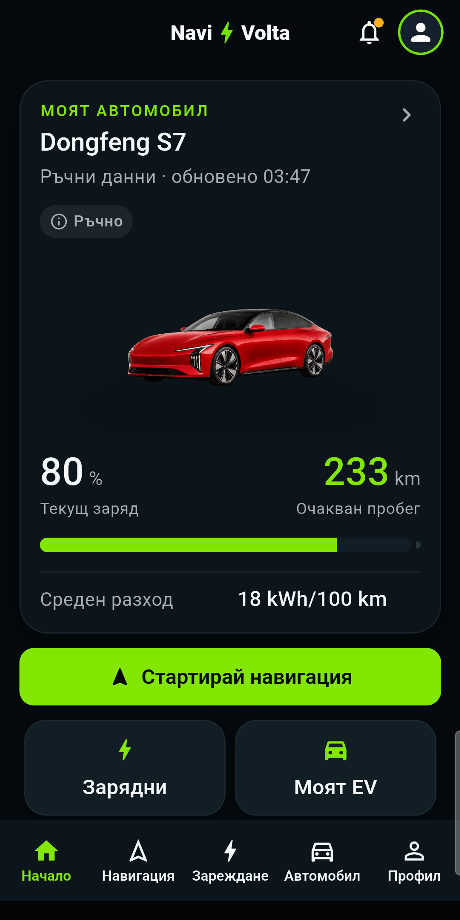
Началният екран на NaviVolta с автомобила, заряда и очаквания пробег
the important part

How to tell us
what is wrong

Straight from the app

The fastest way — no links to hunt for, it is all inside:

Profile Feedback opens a short form

Or directly, if a computer suits you better:

https://docs.google.com/forms/d/e/1FAIpQLSekYtRUcnnWW-xUuqLajoHcauukqN0QW1N3Oz2OpOvE3-UHyA/viewform

What to write so we can actually fix it

A single line saying “it does not work” does not help us. Answer these four:

What you were doing“I planned a Sofia → Plovdiv route in Energy mode.”
What you expected“To show one charging stop along the way.”
What happened instead“It said the route was impossible.”
Phone and Android versionSettings → About phone
the difference

✕ “The chargers do not work.”

✓ “In Plovdiv the Mall Plovdiv station is missing from the map, and I use it every week. Samsung S21, Android 14.”

If the app closes on its own

Tell usexactly what you tapped in the seconds before. That is the most valuable thing you can give us — with it we find the problem in minutes instead of days.

A screenshot helps

If the problem is visible, send a screenshot. But blur your home address first if it shows on the map.

we know

What does not work yet

No need to report these — we know about them and they are being worked on.

WhatWhy
The route price is an estimate, not a billWe calculate from average tariffs; the real price at a given station may differ.
Routing is not EV-specialisedWe use standard routing plus our own energy model. The specialised kind has not been unlocked for us by the provider yet.
About 907 stations in BulgariaFrom five public sources. For 118 of them we also know whether they are free right now; for the rest, only that they exist.
Charger prices are the “roaming” tariffIt may be higher than what you would pay with that operator's own card.
The car images are generatedThey resemble the car but are not official. Some colours come out oddly.
There is no account and no syncYour data stays on this phone alone. There is a manual backup to your own Google Drive if you want it.
Statistics start from zeroIt only shows trips made with the app.
your privacy

Do not send us personal data

In the form, do not write your home or work address, a registration plate, a phone number, or other people's email addresses. If you send a screenshot, blur your home address if it is visible.

The app itselfsends us nothing on its own. Your garage, trips and documents stay on the phone. Location is used only to make navigation work. The full policy is at navivolta.app/privacy.

When to stop immediately

Stop using the app while drivingand write to us at once if:

  • The instructions send you somewhere dangerous — into oncoming traffic, the wrong way down a one-way street, into a banned turn.
  • The app freezes or closes during navigation.
  • The phone gets very hot or the battery drops sharply.
  • Anything makes you perform a sudden manoeuvre.

Stop the navigation, carry on by a route you know or with another app, and describe what happened at the first opportunity. If it is something that could cause a crash, write immediately — not at the end of the day.

navivolta.app@gmail.com

A few last things

Do not forward the app to other people. Access is personal and can be withdrawn.

If you like something, tell us that too. It helps us know what not to touch.

If you would rather stop testing, just say so. No explanation needed.

Become a tester